Ahead of the 2020 general election on Nov. 3, social media platforms like Facebook are encouraging everyone to vote or register to vote if they haven't.
Those reminders can get a little annoying, especially if you have already voted or are already registered to vote with plans on voting.
There are ways to turn them off, and one viral post on social media shows you how. We tried it and it does work.
First, hit the three lines on the bottom right bar of the Facebook mobile app. Then scroll all the way down to "see more."

After hitting "see more, continue scrolling until you see "Town Hall" and click on it.

After hitting Town Hall, click on "Settings" in the top right.
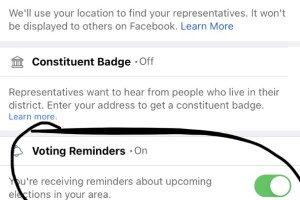
Finally, you can see the "voting reminders" as the last option on the screen. Toggle the button from on to off.
This article was written by WXYZ.